

In this post, i shall be limiting myself to how you can configure your Handler UI java Applications.Handler Applications has become part and parcel of our mobile phone live but some people still finding it very difficult setting this java applications to work. You may be asking me why should i manually setup my java handler applications when thr default settings can work pretty well. well the answer is yes and No.
I will give you two valid reason why you must know how to set up your handler applications:
1. The majority of the people who uses handlers applications are those who wants to get the best out of it like making it to download (Note: opera mini.jar downloaded from opera official site will never download the setup of any file in .jar extension it will surely redirect you to your phone’s default browser) Handlers UI Applications.jar is very good in downloading any types of file most especially the opera 4.2 labs 150 version of it. So if you wish to download with your java handler opera mini then you must tweak your handler settings. you need to change the server to a better one and you need to enable the options to download .jar from the settings menu (Note: if you want to enable the option to download .jar files opmin42_labs_ui150-multi_windows_with_useragents_that can download java Just press Menu>>tools>>settings>>Handler Menu then scroll down until you see two check boxes namely: Use._jar to Download .jar file and Try to rename back ._jar to .jar file make sure you check all three boxes and you are done)
2. Second reason is that if you are able to browse free on your network, popular people in this area are Nigerians, Zambians iranians, philippinos indian e.t.c we are so fond of free gprs and the the best possible way to browse free is with handler UI mods
3. Most of the time the slowest server comes as default with your handler UI java Apps you may need to change this to speed up your connections. Besides to use free browsing cheats like space trick, @trick, dot trick, front query trick, proxy server trick…. you need the knowledge on how to manipulate the handler menu interface.
Now How to Acess the Handler Menu On Opera 4.2, and 6 handler:
to access the handler menu on opera mini 4, 5, 6, and 7 next you can get it from the first opening of the application (this is more common on all handlers)
To however get to the advance features of opera 4.2 handler labs which include the .jar download options and customizeable user agentsthen follow my instructions above
The format am dropping here is for all handlers and multi operators e.g bolt handler cheat, ucweb, mozat, nimbuzz.
METHOD TO CONFIGURE A HANDLER UI JAVA APPLICATION USING THE APPLICATION SERVER AS A REVERSE IP CREATE A CONFIGURATION SETTING WITH D FOLLOWINGS :
The example i use here is for etisalat nigeria Network
-APN: etisalat
-Username: etisalat
-Password: etisalat
-ip=82.145.210.160
-Port: 80
(Note:s40 nokia java phones should create the prov for the above ip or check the downloads)
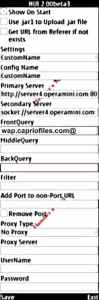
NOW GOTO YOUR HANDLER APPLICATION MENU AND FILL AS FOLLOWS DEPENDING ON YOUR NETWORK PROVIDER:
am using the opera 4.2 handler as my example here but it can be any handler the format is the same
-HTTP Server: http://server4.operamini.com or http://82.145.210.160 the server compatible with that particular handler application 9e.g for nimbuzz it is bosh.nimbuzz.com)
-FrontQUERY: blank
-MiddleQUERY: blank
-Filter: blank
-Add Port to non-Port URL: blank
-Remove Port: Dont mark
-Proxy Type= HTTP
-PROXY SERVER: wap.gloworld.com and for etisalat use www.google.com.ng or www.etisalat.com.ng or your network service provider’s freesite or homepage
Username: blank
Password: blank
Now click options and save config
That is just the layman view of how to setup a handler Application you can learn more about Handlers HERE
We are having free sites in south africa, how can we setup free internet then?