
Check the Signal Strength of Android and Apple Phones Accurately
How to View Your Network Signal Strength on Apple Phones
- Open the iPhone’s dialing interface/keypad, enter *3001#12345#* in the dialing key, and click the dialing button to view the phone’s signal-related data.


- Click [Rach Attempt] under [4G] to view the 4G signal strength value (rsrp, -87 in the picture below):


- PLMN: Operator’s public land mobile network code. Every carrier is different. PLMN consists of MCC (Mobile Country Code, 3 digits) and MNC (Mobile Network Code, 2-3 digits). 46011 is the Telecom’s 4G/5G value in my image.

KCTCellMonitorBWPSupport: Support type for carrier bandwidth adaptation.

- Band Info: Frequency band number 78 in the picture below refers to n78.

- Bandwidth: Frequency bandwidth, the picture is 20MHz.
- CellID: cell number.
- Radio Access: Wireless access type. NR is 5G and LTE is 4G.
- NRARFCN: 5G frequency point number. A total of 3279165 grids are drawn in the frequency band range 0-100GHz. These rasters are numbered starting from 0 and going up to 3279165. Each number represents an absolute frequency domain position, and these numbers are called NR-ARFCN. This frequency number has its calculation formula, which can be checked online.
- PCI: Physical Cell Identifier, physical cell identifier. They are used to distinguish wireless signals from different cells.
- TAC: Tracking Area Code, tracking area code. The operator allocates it and serves as a unique identifier for mobile user positioning.

How to view The Signal strength on An Android phone

Analysis of Android Phone Signal Strength Metrics
- LTE and 5G: asu=dBm+140
- WCDMA sum GSM: asu=(dBm+113)/2
- The network type is 5G_SA, which means 5G independent networking (Standalone). Regarding SA and NSA, you can read here.
How to View Signal Strength Using Third-Party Apps


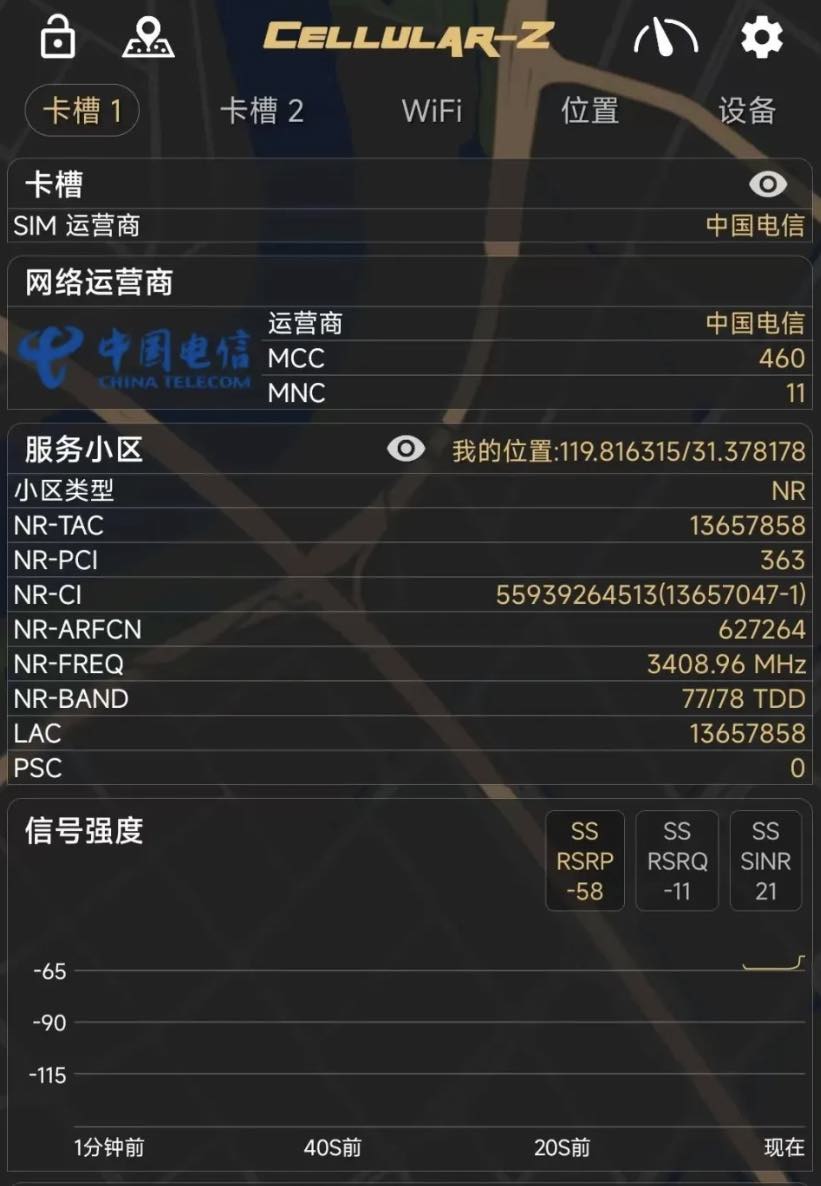
Signal Status Info Using Cellular Z App
There is NR-FREQ, which is the mobile phone’s current specific 5G frequency. Signal strength numerical values are displayed, and dynamic graphs are also displayed. As mentioned before, the lower the value’s absolute value, the better the signal.
Definition Of Terms Of The Signal Parameters
- RSRP: Reference Signal Receiving Power, reference signal receiving power. What we mainly look at is this parameter. It is the average signal power received on all REs (resource elements) carrying the reference signal within a certain Symbol (symbol). The range is between -44 and -140. Bigger is better.
- RSRQ: Reference Signal Receiving Quality, reference signal receiving quality. It is the ratio of RSRP and RSSI, ranging from -3 to -19.5. The bigger, the better. It mainly sorts different LTE candidate cells based on signal quality. This measurement is used as input for handover and cell reselection decisions.
- RSSI: Received Signal Strength Indication, received signal strength indication. It attenuates with distance and is usually a negative value. The closer the value is to zero, the higher the signal strength. If the RSSI continues to be too low, the uplink signal received by the base station is too weak, which may lead to demodulation failure. If the RSSI continues to be too high, the received uplink signal is too strong and interferes with each other too frequently, which also affects signal demodulation.
- SINR: Signal to Interference plus Noise Ratio, signal to interference plus noise ratio. It represents the ratio of the strength of the desired signal received to the strength of the interfering signal (noise and interference) received.
Let’s Talk Briefly About Wi-Fi Frequency Bands


Leave a Reply